
Customer Service Chatbot Improved with Retrieval-Augmented Generation Technology
Experience the Chatbot Application Here
Customer service stands as a critical pillar for businesses aiming to enhance customer satisfaction. It’s not just about resolving issues; it’s about creating a positive, endearing experience that leaves customers feeling valued and heard. In today’s fast-paced world, where choices are plentiful and loyalty is hard-earned, businesses that prioritize customer service not only retain their customer base but also attract new ones through word-of-mouth and positive reviews.
The importance of customer service in increasing customer satisfaction cannot be overstated. It’s often the direct interaction between the customer and the business, acting as a touchpoint for assessing the company’s commitment to its clients. Excellent customer service can lead to repeat purchases, higher customer lifetime value, and differentiation in a crowded market. Conversely, poor customer service can significantly damage a brand’s reputation and its bottom line.
Integrating Large Language Models (LLM) into chatbots presents an innovative solution for elevating the standard of customer service. LLM chatbots can transform customer interactions in several ways:
24/7 Availability: They ensure that customers receive immediate assistance at any time of the day, significantly reducing wait times and improving overall satisfaction.
Personalization: LLM chatbots can analyze customer data and previous interactions to provide personalized responses, making customers feel understood and appreciated.
Scalability: They can handle a vast number of queries simultaneously, ensuring that customer service quality does not diminish during peak times.
Consistency: LLM-powered chatbots provide consistent answers to frequently asked questions, ensuring that the information provided is accurate and reliable.
Efficiency: By automating routine inquiries, they allow human agents to focus on more complex and sensitive issues, thereby increasing the efficiency of the customer service department.
Insights: LLM chatbots can analyze interactions to identify common issues, preferences, and trends, providing valuable insights that can be used to further improve products and services.
In summary, customer service is essential for businesses looking to increase customer satisfaction. By incorporating LLM-powered chatbots, companies can offer responsive, personalized, and efficient service, setting the foundation for long-term customer loyalty and sustained business success.

Continuing from the significance of customer service in enhancing customer satisfaction, in the following post, we delve into how we can further augment customer service capabilities by leveraging Retrieval-Augmented Generation (RAG) techniques alongside cutting-edge technologies. This approach not only amplifies the benefits brought by LLM-powered chatbots but also introduces a new layer of efficiency and personalization in customer interactions.
Utilizing RAG techniques, we can enhance the chatbot’s ability to provide accurate, contextually relevant information by retrieving and generating responses based on a vast database of information. This ensures that customers receive answers that are not only immediate but also highly pertinent to their queries, further increasing satisfaction and trust in the service provided.
To implement this advanced customer service solution, we use a combination of powerful tools and technologies:
Python: The backbone of my development, Python allows us to write efficient, readable code for my chatbot, integrating LLM and RAG functionalities seamlessly.
Streamlit App: We leverage the Streamlit framework to create interactive, web-based dashboards that offer users a visually engaging way to interact with the chatbot. This enhances the user experience by making interactions simple, intuitive, and accessible.
Docker Container: By containerizing my application with Docker, we ensure that it can be deployed consistently and reliably across any environment. This facilitates easy scaling and updating of my service, making it robust and flexible.
GCP Cloud Run: Deploying the application on Google Cloud Platform’s Cloud Run service, we take advantage of a fully managed platform that allows the chatbot to scale automatically in response to incoming requests. This ensures high availability and performance, even during peak usage times.
OpenAI GPT-3.5: At the heart of the chatbot is OpenAI’s GPT-3.5, a state-of-the-art language model that provides the ability to generate human-like text responses. This model powers the chatbot’s understanding and generation capabilities, making it capable of handling a wide range of customer service inquiries with high accuracy and relevance.
By integrating these technologies with RAG techniques, we create a customer service solution that is not just reactive but also proactive in addressing customer needs. Stay tuned for the detailed post, where we will break down the implementation process, showcase real-world applications, and demonstrate the tangible benefits of my advanced customer service system.
To see the advanced customer service solution in action, showcasing the integration of Retrieval-Augmented Generation techniques, Python, Streamlit app, Docker containers, GCP Cloud Run, and OpenAI GPT-3.5, visit my application running live on Google Cloud Platform:
This link will take you directly to my interactive chatbot application, where you can witness firsthand the responsiveness, personalization, and efficiency of customer service solution. Engage with the chatbot to explore its capabilities and see how it leverages the latest in AI technology to deliver an unparalleled customer service experience.
Implementation
In this section, we go over imeplementation details. you find all code in the github repo. First, we need to have a conversetaional data for RAG. Fortunatetly, we can find a customer service data on Kaggle (here). The dataset on Kaggle, “Customer Support on Twitter,” comprises data extracted from customer support interactions on Twitter. It includes over 3 million tweets and replies from the biggest brands on Twitter, aiming to facilitate analysis and development of models for customer support on social media platforms. The data allows for exploration into how companies manage public customer service interactions in a digital age, providing insights into response times, the effectiveness of social media in resolving customer issues, and the overall impact of these interactions on brand perception.
The chart illustrates how companies are distributed across the dataset. To make things easier, we’ll focus only on tweets about Amazon and Apple, as they represent the bulk of the data we’re dealing with.
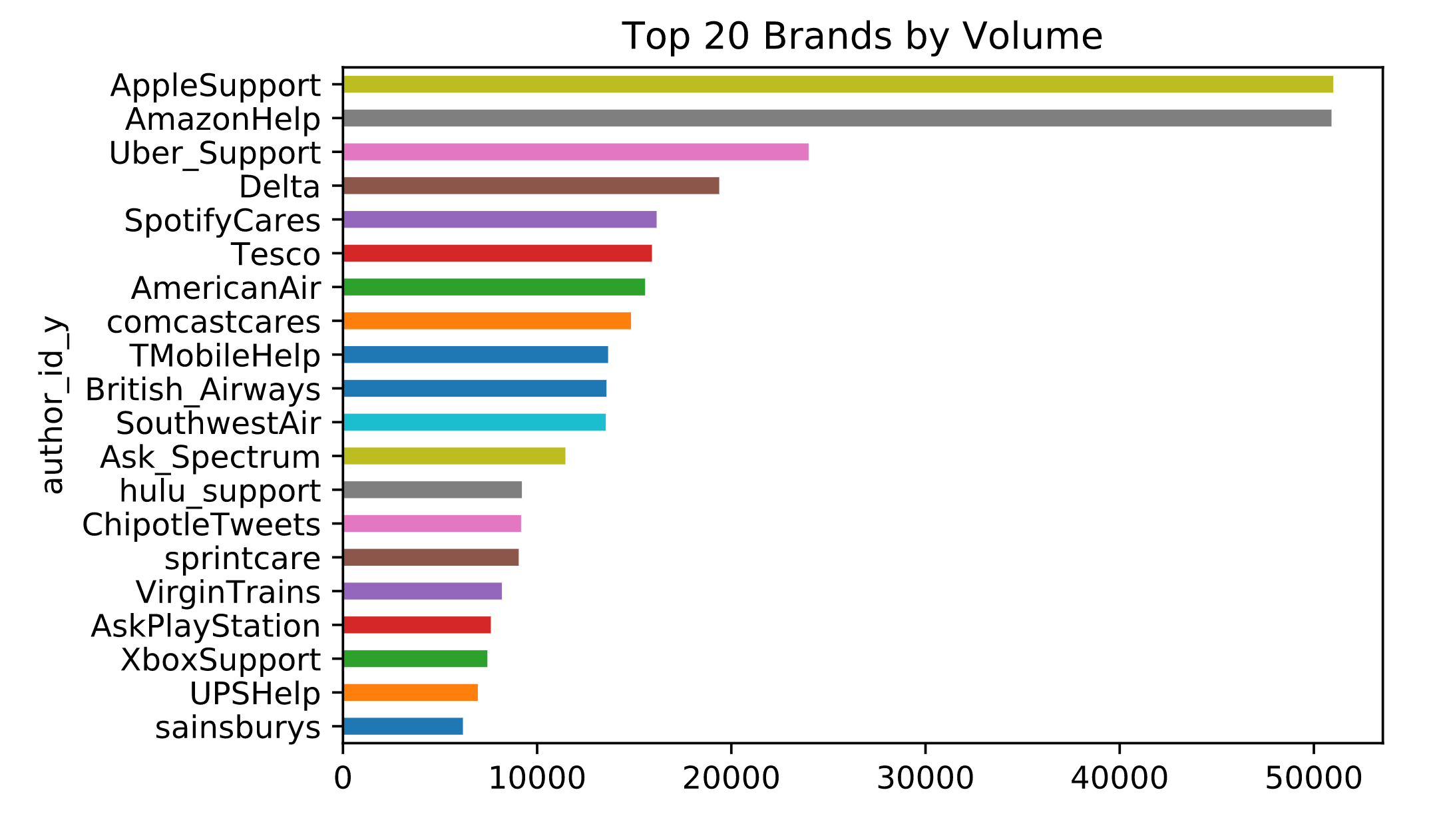
The complete guide for preparing your data is available in the notebook linked here. Below, we have outlined the key elements involved in data preparation. To prepare the text for the chatbot, we start by cleaning it up: we convert all text to lowercase, and remove any URLs, hashtags, mentions, as well as special characters and numbers. After this initial cleanup, we utilize the NLTK package to lemmatize the text, which involves reducing words to their base or root form.
import re
from nltk.stem import WordNetLemmatizer

# Download necessary NLTK data
nltk.download('stopwords')
nltk.download('wordnet')
nltk.download('omw-1.4')

# Initialize lemmatizer
lemmatizer = WordNetLemmatizer()

# Define a function to clean the text
def clean_text(text):
    # Convert text to lowercase
    text = text.lower()

    # Remove URLs
    text = re.sub(r'http\S+|www\S+|https\S+', '', text, flags=re.MULTILINE)

    # Remove mentions and hashtags
    text = re.sub(r'@\w+|#\w+', '', text)

    # Remove special characters and numbers
    text = re.sub(r'\W+|\d+', ' ', text)

    # Expand contractions (Here we skip this step due to complexity, but it can be done using libraries like contractions)

    # Lemmatize text
    text = ' '.join([lemmatizer.lemmatize(word) for word in text.split()])

    return text

# Apply the cleaning function to the text column
tweets['text'] = tweets['text'].apply(clean_text)
Furthermore, our dataset includes tweets in languages other than English, which we need to exclude. To accomplish this, we employ the Spacy package. Additionally, it’s necessary to translate emojis into text, for which you’ll find instructions in the notebook. The table below displays sample data that is ready to be processed by the RAG LLM chatbot.
| Conversation |
|---|
| Customer: what is wrong with my keyboard. Customer Service: fill u in on what is happening then we can help out from there. |
| Customer: where is my order. Customer Service: i m sorry it hasn t arrived please reach u here so we can look into available option. |
| Customer: my apple music isn t working. Customer Service: let s look into that what issue are you experiencing with apple music. |
We utilize Streamlit for developing the app’s front-end. Below is the specified code.
import streamlit as st
from llm_engine import llm_response

st.title("LLM ChatBot enhanced by RAG")

# Initialize chat history
if "messages" not in st.session_state:
    st.session_state.messages = []

# Display chat messages from history on app rerun
for message in st.session_state.messages:
    with st.chat_message(message["role"]):
        st.markdown(message["content"])

# Accept user input
if prompt := st.chat_input("Welcome. How may I assist you ?"):
    # Add user message to chat history
    st.session_state.messages.append({"role": "user", "content": prompt})
    # Display user message in chat message container
    with st.chat_message("user"):
        st.markdown(prompt)

    # Display assistant response in chat message container
    with st.chat_message("assistant"):
        response = st.write_stream(llm_response(prompt,st.session_state.messages))
    # Add assistant response to chat history
    st.session_state.messages.append({"role": "assistant", "content": response})
This Python code snippet is designed to create a chatbot application using Streamlit, a popular web app framework for machine learning and data science projects, and a hypothetical library or module named llm_engine, which seems to handle generating responses based on a large language model (LLM) enhanced by Retrieval-Augmented Generation (RAG).
Key components and their functionality in the script include:
Streamlit UI Components: The code utilizes Streamlit’s UI components to create a web-based chat interface.
st.titlesets the title of the web app.st.chat_messageandst.markdownare used to display chat messages and the assistant’s responses in a structured format, enhancing user interaction.Session State Management: Streamlit’s
session_stateis employed to maintain a persistent chat history across reruns of the app. This feature ensures that previous conversations are not lost when the app is refreshed or updated, providing continuity in the chat experience.User Input Handling: The application accepts user input through
st.chat_input, a method for rendering a chat input box in the Streamlit app. This input is then added to the session state as part of the chat history.Response Generation: Upon receiving user input, the code interacts with the
llm_engine.llm_responsefunction, passing the user’s prompt and the current chat history. This function is likely responsible for generating responses based on the input prompt and any relevant context from the chat history. The generated response is displayed using Streamlit’s UI components and is also added to the chat history for future reference.Dynamic Content Update: As users interact with the chatbot, their messages and the assistant’s responses are dynamically added to the chat interface, providing an interactive and engaging user experience.
In summary, the code snippet outlines the foundation for a web-based chatbot application that leverages Streamlit for UI presentation and an LLM enhanced by RAG for generating contextually relevant responses, with a focus on maintaining a continuous and dynamic chat history.
In the following section, we will explore the llm_response method, which is imported from the llm_engine.py file. The Langchain package has been selected for constructing the LLM engine.
from langchain_core.messages import HumanMessage
from langchain_core.prompts import ChatPromptTemplate, MessagesPlaceholder
from langchain_core.messages import AIMessage
from langchain.memory import ChatMessageHistory
from langchain_core.output_parsers import StrOutputParser

from langchain_community.document_loaders import GCSFileLoader
from langchain.text_splitter import RecursiveCharacterTextSplitter
from langchain_community.vectorstores import Chroma
from langchain_openai import ChatOpenAI, OpenAIEmbeddings
from langchain_core.runnables import RunnablePassthrough


chat = ChatOpenAI(model="gpt-3.5-turbo-1106", temperature=0.5)


def llm_response(question,chat_hist):
    demo_ephemeral_chat_history = ChatMessageHistory()
    if len(chat_hist) != 0:
        for message in chat_hist:
            # print(message['props']['children'][0]['props']['children'],message['props']['children'][1]['props']['children'])
            user_prev = message['props']['children'][0]['props']['children']

            bot_prev = message['props']['children'][1]['props']['children']
            if user_prev.lower()[:3] == "you":
                demo_ephemeral_chat_history.add_user_message(user_prev[4:])
            if bot_prev.lower()[:3] == "bot":
                demo_ephemeral_chat_history.add_ai_message(bot_prev[4:])


    loader = GCSFileLoader(project_name="github-page", bucket="port-llm", blob="rag_data.txt")

    data = loader.load()


    text_splitter = RecursiveCharacterTextSplitter(chunk_size=100, chunk_overlap=0)
    all_splits = text_splitter.split_documents(data)

    vectorstore = Chroma.from_documents(documents=all_splits, embedding=OpenAIEmbeddings())
    retriever = vectorstore.as_retriever(k=4)


    def format_docs(docs):
        return "\n\n".join(doc.page_content for doc in docs)

    llm = ChatOpenAI(model_name="gpt-3.5-turbo", temperature=0.5)

    contextualize_q_system_prompt = """Given a chat history and the latest user question \
    which might reference context in the chat history, formulate a standalone question \
    which can be understood without the chat history. Do NOT answer the question, \
    just reformulate it if needed and otherwise return it as is."""
    contextualize_q_prompt = ChatPromptTemplate.from_messages(
        [
            ("system", contextualize_q_system_prompt),
            MessagesPlaceholder(variable_name="chat_history"),
            ("human", "{question}"),
        ]
    )
    contextualize_q_chain = contextualize_q_prompt | llm | StrOutputParser()

    qa_system_prompt = """You serve as an accommodating Customer Support Chatbot, ensuring customer contentment by addressing their inquiries.
    Your role is to paraphrase the following context and assist customers with subsequent actions.
    Provide price matching or discounts to maintain customer satisfaction and loyalty.

    <context>
    {context}
    </context>
    """
    qa_prompt = ChatPromptTemplate.from_messages(
        [
            ("system", qa_system_prompt),
            MessagesPlaceholder(variable_name="chat_history"),
            ("human", "{question}"),
        ]
    )


    def contextualized_question(input: dict):
        if input.get("chat_history"):
            return contextualize_q_chain
        else:
            return input["question"]


    rag_chain = (
        RunnablePassthrough.assign(
            context=contextualized_question | retriever | format_docs
        )
        | qa_prompt
        | llm
    )

    resp = rag_chain.invoke({"question": question, "chat_history": demo_ephemeral_chat_history.messages})
    return resp.content
The provided Python code is a complex script that integrates several components from the LangChain library and other sources to create a chatbot application capable of handling and responding to user queries with contextual awareness. Here’s a summary of its main functionalities and components:
Environment Setup: The script imports necessary modules from
langchain_core,langchain,langchain_community, andlangchain_openailibraries. These imports include classes for handling messages, chat prompts, chat message history, output parsers, document loaders, text splitters, vector stores, and OpenAI interactions. It also sets up environment variables for OpenAI and Google Cloud credentials by reading a key from akeys.txtfile and specifying the path to Google Cloud credentials.Chat Initialization: Initializes a
ChatOpenAIobject with the GPT-3.5 Turbo model and a specified temperature setting. This object is presumably used for generating responses to user queries.- LLM Response Function (
llm_response): This function defines the workflow for generating responses to user questions, incorporating a historical chat context. It includes several steps:- Chat History Handling: Builds an ephemeral chat history from the provided
chat_histinput, carefully adding user and bot messages to maintain context. - Document Retrieval and Splitting: Loads a document from Google Cloud Storage using
GCSFileLoader, splits the document into chunks usingRecursiveCharacterTextSplitter, and then usesChromaandOpenAIEmbeddingsto create a vector store for document retrieval. - Contextualized Question Formation: Uses a
ChatPromptTemplateto reformulate the user’s question based on the chat history, aiming to create a standalone question that can be understood without needing access to the entire chat history. - Retrieval-Augmented Generation (RAG): Implements a retrieval-augmented generation process where the reformulated question is used to retrieve relevant document chunks. These chunks are then formatted and used to generate a response to the original question, taking into account the context of the entire conversation.
- Chat History Handling: Builds an ephemeral chat history from the provided
- Response Generation: The final response is generated by invoking a chain of operations that includes contextual question reformulation, document retrieval, document formatting, and finally, generating a response using the
ChatOpenAImodel.
In summary, this script is designed to create a sophisticated chatbot that leverages the capabilities of large language models, document retrieval, and text splitting to provide contextually aware responses to user queries. It demonstrates an advanced use case of combining various AI and NLP components to enhance the quality of chatbot interactions.